> ## Documentation Index
> Fetch the complete documentation index at: https://docs.mergent.co/llms.txt
> Use this file to discover all available pages before exploring further.
# Introduction to Tasks & Schedules
> Get to know tasks and schedules, the primary components for background job management in Mergent
Mergent offers two main constructs to manage your background jobs: **tasks** and
**schedules**. Although they are used to accomplish similar goals, their usage
and functionality are quite different.
In a hurry and want a quick comparison? [Jump to the comparison
table](#tasks-vs-schedules).
## Tasks
Think of a task as a single unit of work. You can create tasks when certain events occur in your application - a user making a purchase, signing up for your newsletter, and so on. Once such a task is created, Mergent adds it to a queue and ensures it's reliably processed by your application.
Tasks are ideal for **one-off**, asynchronous jobs that need to be done outside the main application flow.
## Schedules
Schedules represent **recurring** work that needs to be done at regular intervals. These intervals can be defined by a **cron** expression or an **rrule**, giving you the flexibility to schedule tasks as often as needed - be it every minute, daily, or even every third Tuesday of the month.
When a schedule is triggered, it creates a task, just like any other task you'd manually create. Mergent then sends this task to your application for processing.
Schedules are perfect for tasks that occur regularly, like sending out weekly newsletters, generating monthly reports, or performing daily data clean-up.
## Tasks vs. Schedules
| | Tasks | Schedules |
| ---------------------- | ----------------------------------------------------------------------------------------------------------- | ---------------------------------------------------------------------------------------- |
| **Frequency** | Individual, **one-off** jobs. | **Recurring** jobs, as often as needed (minute, daily, specific weekdays, etc.). |
| **Functionality** | Once created, the task is added to a queue and Mergent ensures it's reliably processed by your application. | When triggered, the schedule creates a task which is then processed by your application. |
| **Time Options** | 1. Immediately when queued
2. After a `delay`
3. At a specific `scheduled_for` time & date | Recurring based on the provided `cron` or `rrule`. |
| **Failures & Retries** | Automatically handles failures and retries. | Schedules themselves don't handle failures, but the tasks they create do. |
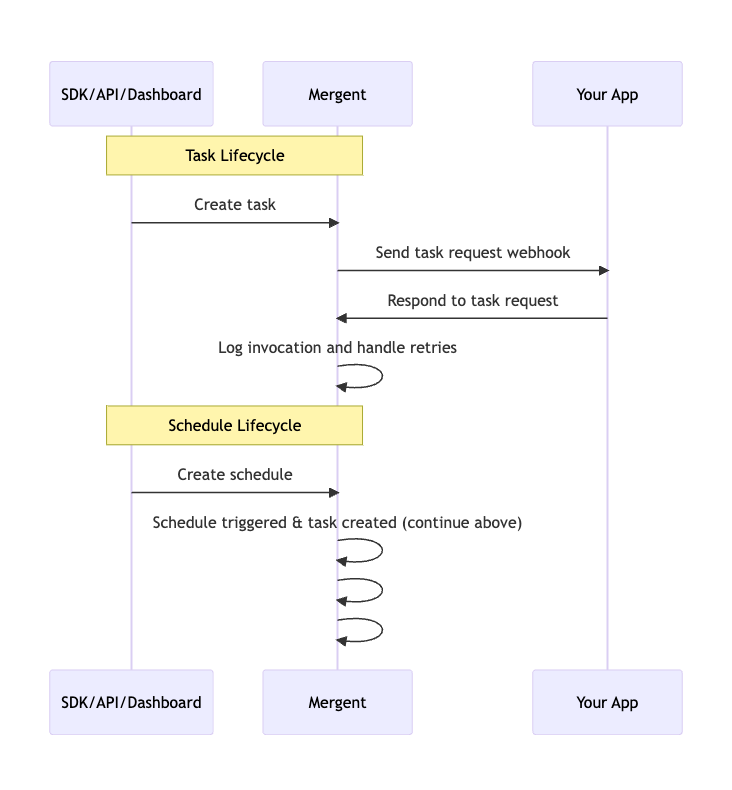
The following sequence diagram shows the workflow of creating and processing
both tasks and schedules in Mergent. You can click the diagram to zoom.